Open in
Editing tactical understanding
If the tab is missing, the first team has no players.
Use the Tactical Understanding page to raise a team's match exposure and training contribution in each tactical area, and its Team Cohesion. Clubs and national teams both have it. It follows the game's Training → Tactical Effectiveness → Tactical Understanding screen. In FMRTE 26 this page was called Match Preparation.
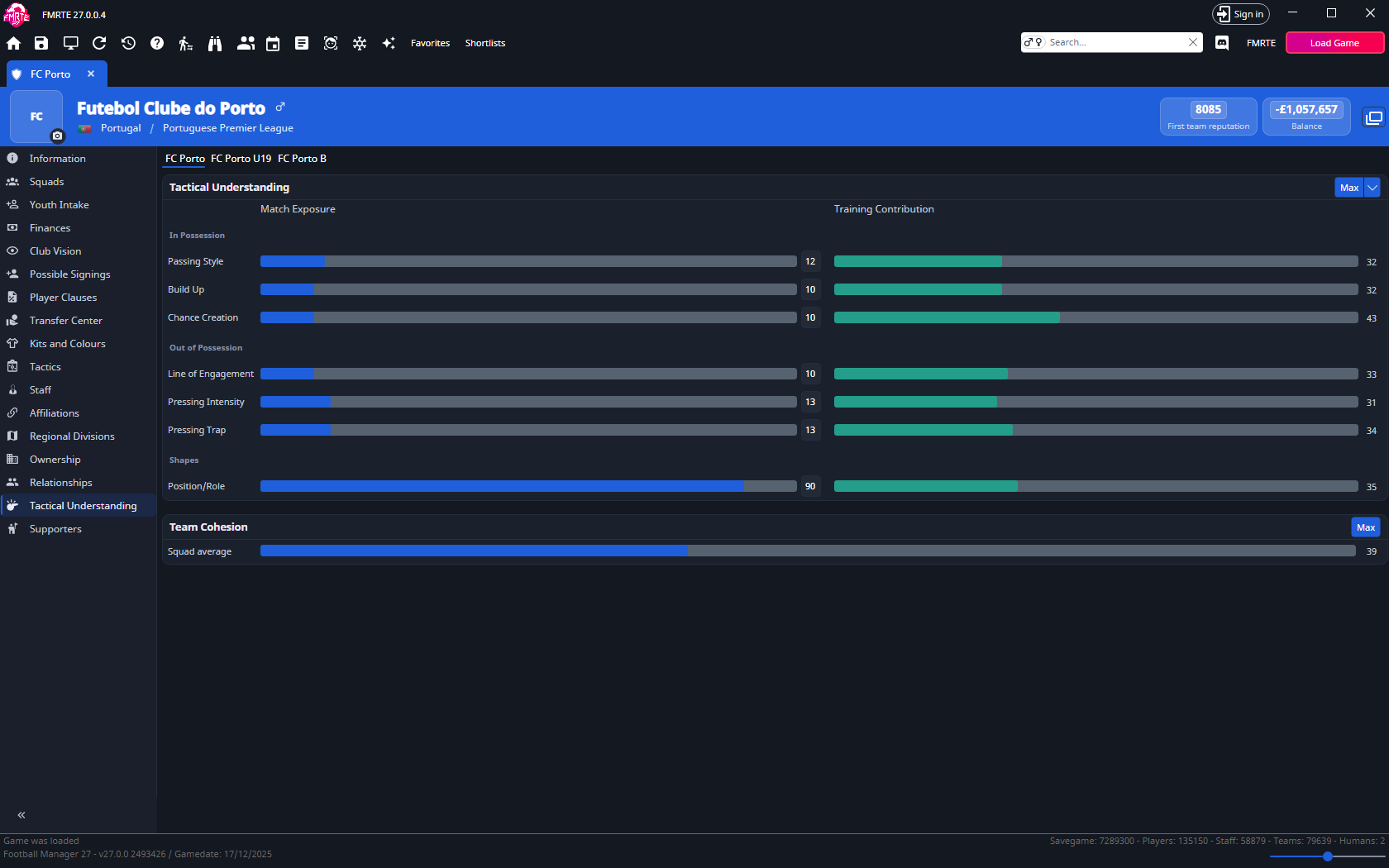
What the page shows
On a club, the first team and each other team with players has its own tab at the top. On a nation, open Tactical Understanding and select Men's Football or Women's Football.
Every area shows a team average from 0–100 in two columns:
- Match Exposure has a bar and a text box you can edit.
- Training Contribution shows what training adds on the tactic in use. You can't type a value here. It shows for a team managed by a human.
| Group | Areas |
|---|---|
| In Possession | Passing Style, Build Up, Chance Creation |
| Out of Possession | Line of Engagement, Pressing Intensity, Pressing Trap |
| Shapes | Position/Role |
Change the values
Type a value in a Match Exposure text box, or press or drag along its bar. The text box shows the change as pending until you save.
Select Save Changes to apply the new values to the team's players. Only the areas you changed are saved. To raise Training Contribution, use Max.
The save is listed in Edit History, but it cannot be undone there.
Set everything to the maximum
Max, at the top right of the Tactical Understanding card, sets every area to 100 for the selected team. Max does not change Team Cohesion. Select Save Changes to apply the values.
On a team with the Training Contribution column, Max fills both columns. To fill only one, open the arrow beside Max and pick Match Exposure or Training Contribution.
Raise Team Cohesion
The Team Cohesion card shows the Squad average. You can't type a value here.
- Open the club or nation and select Tactical Understanding, then the team.
- On the Team Cohesion card, select Max.
- Select Save Changes.
Players in the team get full cohesion. In rare cases a player stays as they are. The change can't be undone in Edit History.
Worked example: raise Pressing Intensity
- Open the club and select Tactical Understanding, then the first team's tab.
- Change Pressing Intensity from 60 to 75.
- Select Save Changes.
- In Football Manager, check Training → Tactical Effectiveness → Tactical Understanding.