Open in
Editing coaches and staff
Search for the staff member and open Information to edit their attributes.
Staff tabs at a glance
| Tab | What you'll find |
|---|---|
| Information | Personal details and staff attributes. |
| Contract | Existing club and national-team contracts. |
| Career Plans | Career preferences, jobs and the conditions attached to them. |
| Swap Staff | Swaps between eligible club or national-team jobs. |
| Training Rating | Coaching star ratings for different training areas. |
| Formations/Tendencies | Preferred formations and staff tendencies. |
| Relationships | Relationships with people, teams and nations. |
| Knowledge | Country knowledge entries and their values. |
| Retire Date | An existing scheduled retirement. |
| Languages | Spoken languages and proficiency. |
Contract appears when the person has a club or national-team contract. Retire Date appears when they have a scheduled retirement.
For your own manager's options, see Manager profile.
Staff Languages and Relationships use the same tabs as players. See Languages and Relationships.
Edit an attribute
Staff attributes use 1–20. Groups include coaching, roles, tactics, mental attributes, scouting and chairman attributes.
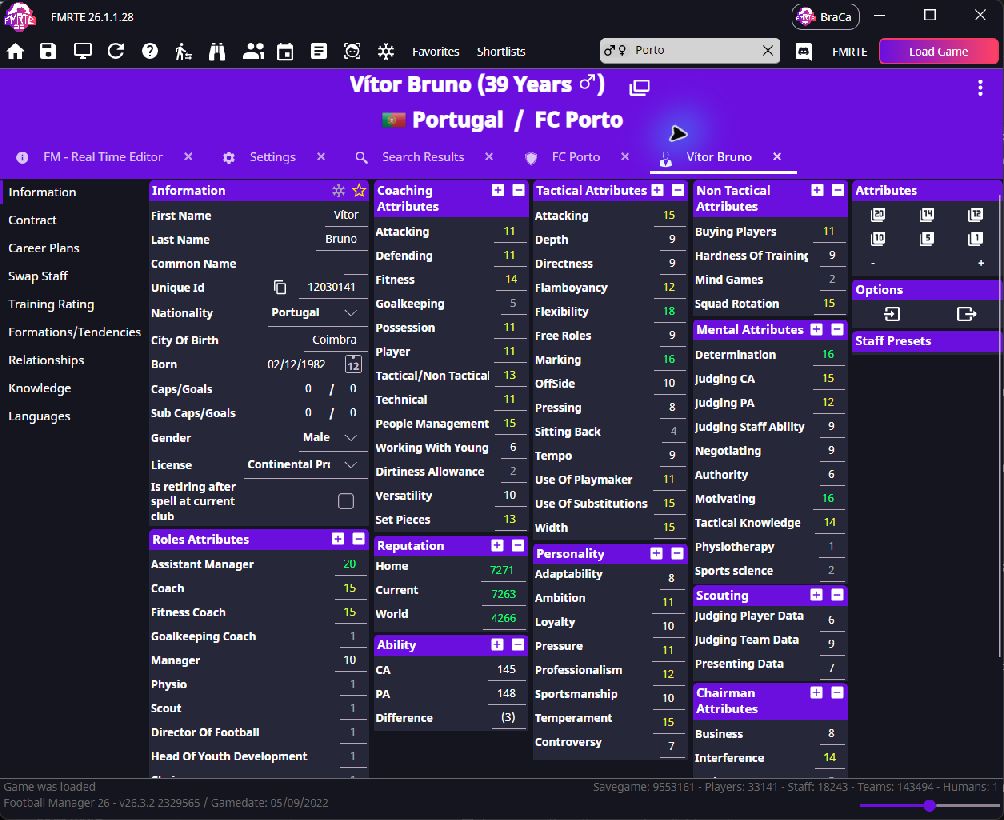
Worked example: improve Working With Youngsters
- Find Coaching Attributes → Working With Youngsters.
- Raise it by one point, such as 12 to 13.
- Select Save Changes.
- Check the same staff member in Football Manager.
Contracts, roles and knowledge
- Contract: edit wages and dates when the page is available. Check the wage period first.
- Role attributes: change suitability; they do not assign a job.
- Knowledge: edit the chosen country or region's value, then save.
- Training Rating: view or edit the coaching star ratings.
Career Plans
Open Career Plans to view the staff member's career preferences. Select a row to see its Options.
- Choose the Condition attached to the plan.
- Choose the Job.
- Set Item Type and use the search button to choose the related club or other entry.
- Choose Scope.
- Select Save Changes.
Use + to add a plan or - to remove the selected plan. For a staff job swap, use Swap Staff.
Training Rating
Training Rating shows coaching star ratings for goalkeeping, defending, possession, attacking, fitness and set pieces. Use the separate tactical and technical ratings to compare coaching areas.
To change a rating:
- Select the stars for the training area you want to change.
- Select Save Changes.
- Reopen Training Rating to check the value.
The ratings are based on staff attributes. You can review those attributes on Information.
Formations/Tendencies
Open Formations/Tendencies to change preferred formations and the listed staff tendencies.
- Choose a formation under Preferred Formation, Second Preferred Formation, Defensive Formation or Attacking Formation.
- Set the matching Out of Possession formation if needed.
- In Tendencies, choose the row's Type and Level.
- Select Save Changes.
Knowledge
Open Knowledge to edit country knowledge. Select an existing entry and use its search button if you want to choose another country. Change Value, then select Save Changes.
Use + to add an entry or - to remove a selected entry. The country-name button opens that nation's page.
Retire Date
Open Retire Date to view the staff member's scheduled retirement. Check Person, change Retire Date, then select Save Changes.
To clear the scheduled retirement, select Remove, then Save Changes. The page also shows Start Date for the retirement record.