Open in
Increase a club's transfer budget
note
This example uses pounds sterling (£). Check the currency setting and use amounts in your selected currency.
Add £1,000,000 to a club's remaining transfer budget.
Before you start
info
You need a loaded savegame and an activated license.
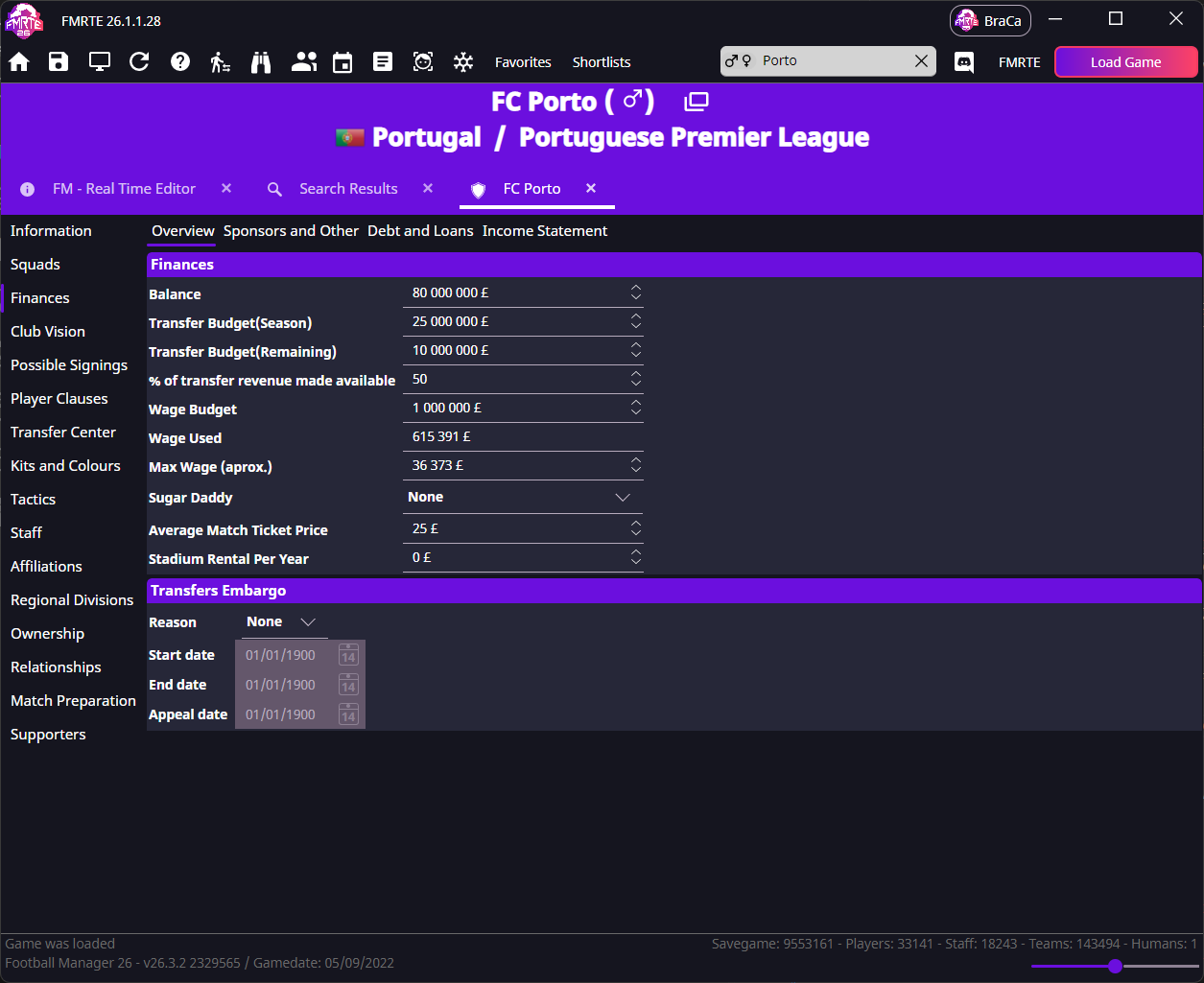
Balance, Transfer Budget(Season), Transfer Budget(Remaining) and Wage Budget are separate fields.
This example changes the remaining transfer budget.
Change the budget
- Find your club using the search box.
- Open Finances → Overview.
- Note the current Transfer Budget(Remaining).
- Add £1,000,000 to that value. For example, increase £9,000,000 to £10,000,000.
- Select Save Changes while the club's finances page is active.
Check the result
- Open the club's finances in Football Manager and check the remaining transfer budget.
- If the new amount is not shown, advance the game and check again.
- Save in Football Manager to keep the change in your save file.
info
Football Manager continues updating club finances as you play.
If it did not work
- The new budget still does not appear after advancing the game: follow A changed value did not stick.
- The amount looks different: compare the currency in each app and check that you are looking at the remaining transfer budget.
- The board still limits a wage offer: see Wage Budget and Max Wage.