Open in
Freeze players and staff
Use the Freezer to maintain selected values for players and staff while you play. Choose which attributes it controls, then freeze the people you want it to apply to.
Before you start
You need a loaded savegame and an activated license.
Freezing a person captures their current values. The Freezer keeps the selected attributes at those values, or allows them to increase if you choose that option. Attributes you leave unselected can change as usual.
Keep FMRTE running with the same savegame loaded for the Freezer to work.
Choose what to freeze
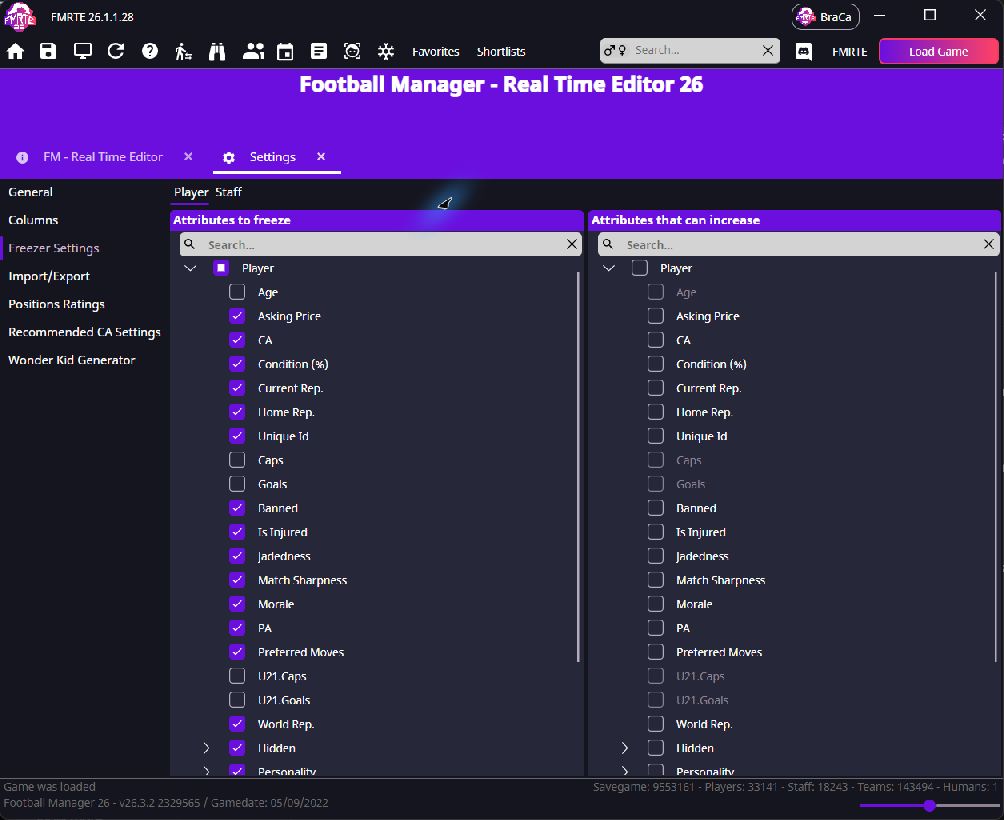
- Open FMRTE → Settings → Freezer Settings.
- Select Player or Staff.
- Under Attributes to freeze, select the attributes you want FMRTE to maintain.
- Under Attributes that can increase, select any of those attributes you want to allow to grow.
- Select Save Changes while Settings is active.
Player settings apply to all frozen players. Staff settings apply to all frozen staff. You can choose different attributes for the two groups.
Freeze players or staff
- Find the player or staff member using the search box.
- Right-click their row in the results and select Freeze.
- Open Freezer Manager.
- Select Player or Staff to see the people you have frozen.
Repeat for anyone else you want to freeze. You can also use the snowflake toggle on a person's Information page.
Continue playing and editing
Continue playing with FMRTE open. To check the maintained values, open the person's Information page and select Reload.
You can edit frozen players and staff as usual. Select Save Changes after editing and FMRTE updates the frozen values automatically.
Allowing an attribute to increase does not make it improve. It lets increases from the game remain while preventing decreases.
Stop freezing
- Open Freezer Manager and select Player or Staff.
- Select the person you want to unfreeze.
- Keep Apply to all cleared to affect only your selection.
- Select Unfreeze.
The person leaves the frozen list. Unfreezing stops FMRTE from maintaining their values. It does not restore earlier values.
If it did not work
- A value changes unexpectedly: check that the person is listed in Freezer Manager and review the selected attributes for Player or Staff in Freezer Settings.
- A new edit changes back: follow the saving checks.
- The player gets injured: see Why does a healed and frozen player still get injured?.