Open in
Keeping values with the Freezer
The Freezer holds selected player or staff values at the level captured when you freeze them. You can also allow selected values to increase.
For a walkthrough from choosing attributes to freezing people, follow Freeze players and staff.
Choose what the Freezer controls
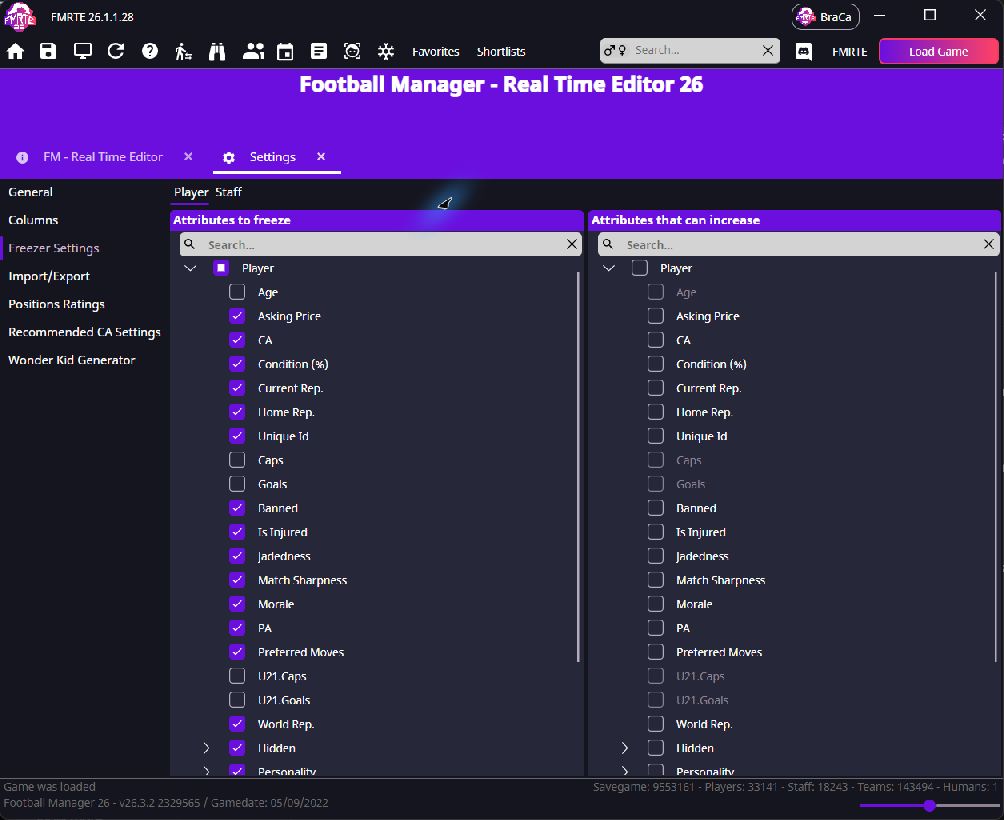
- Open FMRTE → Settings → Freezer Settings.
- Choose Player or Staff. These settings apply to frozen people of that type.
- Select properties in Attributes to freeze.
- Select any of those properties that may grow in Attributes that can increase.
- Select Save Changes while Settings is active.
| Selection | Effect |
|---|---|
| Left only | Hold the captured value |
| Left and right | Allow increases, prevent decreases |
| Neither | Let Football Manager manage the value |
Freeze a player or staff member
- Find the player or staff member using the search box.
- Right-click their row in the results and select Freeze.
- Open Freezer Manager.
- Choose Player or Staff and confirm that the person appears in the list.
You can also use the snowflake toggle on their Information page.

Verify the effect over time
Keep the same savegame loaded while Football Manager advances, then check the selected values. Allowing growth does not guarantee that an attribute will increase.
After restarting FMRTE or changing savegames, check the frozen list and settings again. Restart persistence still needs confirmation.
Edit a frozen player or staff member
Make your changes as usual and select Save Changes. FMRTE updates the frozen values automatically.
If a saved value does not stick, follow the saving checks.
Why does a healed and frozen player still get injured?
Freezing Condition does not freeze every player state or prevent every new injury. Check the actual injury and your selected Freezer properties.
Do I need to leave FMRTE open?
Yes. Ongoing freezing requires FMRTE running with the same savegame loaded. Ordinary saved edits do not require the Freezer to stay active.
Unfreeze
Use Unfreeze when you want FMRTE to stop maintaining a person's values.
- Open Freezer Manager → Player or Staff.
- Select the person and choose Unfreeze.
- Check that they leave the list and the snowflake is off.
Keep Apply to all cleared unless you want to unfreeze every listed record. Unfreezing stops enforcement. It does not undo earlier edits.